

Building a Token-to-OAuth Bridge for Gemini & Self-Hosted Tools
1. Introduction & The Core Problem
Most modern AI assistants (like Google Gemini) support the Model Context Protocol (MCP), allowing them to pull live data from external tools. However, integrating cloud-hosted LLM panels with self-hosted ecosystem tools like ezBookkeeping presents a strict authentication mismatch:
- The Client Constraint: The Google Gemini Connected Apps platform requires OAuth 2.1 (Authorization Code flow) to safely manage delegated cloud access. It demands a
Client ID,Client Secret, and explicit token exchange paths. - The Target Constraint: ezBookkeeping (and many minimalist self-hosted services) uses a lightweight Static Bearer Token (
Authorization: Bearer <TOKEN>) generated directly within its user settings panel. It does not natively run a complex OpenID Connect (OIDC) identity provider.
Because Gemini cannot accept a raw static token in its console, trying to connect them directly results in a protocol rejection error.
2. Architectural Blueprint: The Token-to-OAuth Bridge
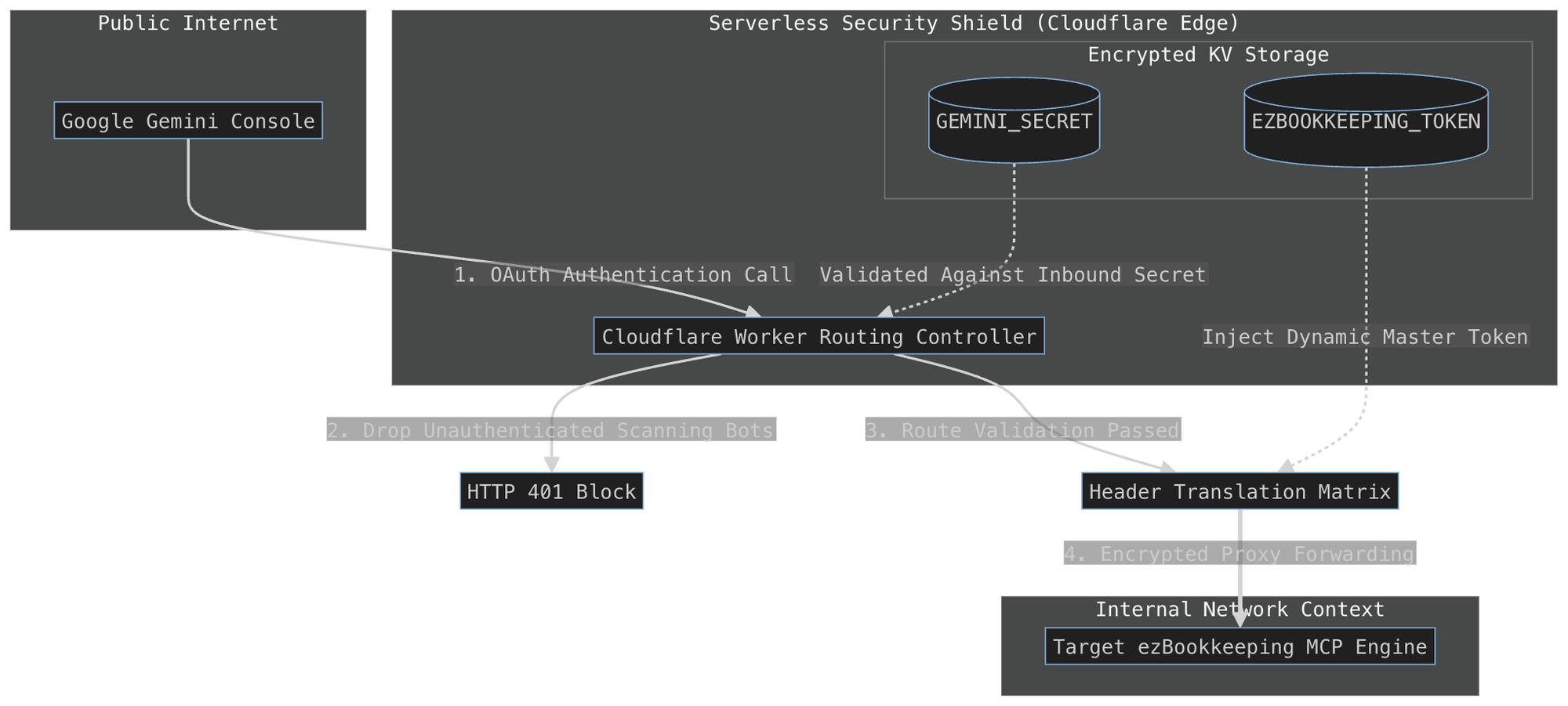
Instead of deploying a heavy identity provider suite (like Keycloak or Authentik) just to authenticate one service, we built a serverless Token-to-OAuth Proxy Bridge using Cloudflare Workers.
The proxy acts as an adapter, pretending to be a complete OAuth 2.1 Identity Server to satisfy Gemini’s security pipeline, while secretly appending the static ledger token to outgoing server requests.
[ Google Gemini Cloud ]
        │
        ▼ (OAuth 2.1 Handshake / Strict Verification)
[ Cloudflare Worker Bridge ]
        │
        ▼ (Inject Master Bearer Token Header)
[ Target ezBookkeeping Server ]
3. How We Built It: Step-by-Step
Step A: Serverless Infrastructure Selection
We chose Cloudflare Workers in Service Worker format because:
- It runs serverless on Cloudflare's edge network, meaning zero server maintenance or runtime configurations.
- It natively supports HTTPS out of the box, ensuring that sensitive data is fully encrypted while moving across the web.
Step B: The Code Mechanics
The script we implemented intercepts inbound web traffic and handles it based on the URL path requested:
- OIDC Discovery Route (
/.well-known/openid-configuration): Gemini probes this path automatically to discover how the server handles authentication. The Worker intercepts this and returns a mock JSON schema announcing that it supports standard authorization code exchanges. - Mock Authorization Endpoint (
/oauth/authorize): When Gemini initiates a connection request, the Worker instantly loops the request back to Gemini with a mock authorization code, bypassing interactive user login screens entirely. - Mock Token Exchange Endpoint (
/oauth/token): GeminiPOSTs its configured Client ID and Client Secret to this route. The Worker parses this payload (handling both HTTP body forms and standard HTTP Basic Auth headers). It strictly matches them against our hidden variables. If verified, it returns a temporary session token signature (BRIDGE_AUTHORIZED_SESSION). - The API Forwarder:
When Gemini sends an actual MCP instruction, the Worker intercepts the payload, checks for the presence of the
BRIDGE_AUTHORIZED_SESSIONstring, swaps out the header, and passes a clean request containing the real ezBookkeeping Bearer Token downstream to the target endpoint.
Step C: Production Hardening & Network Safety
Hardcoding API tokens inside raw code repos creates a security hazard. To ensure production-grade isolation, we:
- Migrated the core secrets (
EZBOOKKEEPING_TOKENandGEMINI_SECRET) entirely out of the code block and into Cloudflare’s Encrypted Environment Variables database. - Implemented global execution bindings (
typeof VARIABLE !== 'undefined') to extract configuration keys safely during execution context handshakes. - Injected a custom TLS bypass parameter (
cf: { tlsVerify: false }) to ensure Cloudflare edge nodes don't drop target connections due to common certificate path mismatches found on self-hosted environments.
4. Key Takeaways for Developers
- Don't over-engineer: You don't always need a heavy auth server. A simple edge script can mimic authentication architectures safely.
- Environment variable hygiene: Keep private production keys out of the code workspace. Let the serverless platform pass them down at runtime.
- Gatekeeping: Even when mocking open routes (like discovery paths), ensure you block all downstream API calls unless requests validate against a strong pre-shared secret.